

ALLENCOMM BLOG | Insights
Rapid Prototyping for Training: How to Validate Learning Design in 5 Days
March 30, 2026
Rapid prototyping is the fastest, most reliable way to validate whether a training program will actually work before you invest fully in production. Instead of spending months building a course only to discover it misses the mark, rapid prototyping compresses the design-test-revise cycle into days. The result? Stronger learning outcomes, fewer costly revisions, and learning experiences your audience actually uses.
What Is Rapid Prototyping in Instructional Design?
Rapid prototyping in instructional design is a development approach where designers create quick, testable versions of training content — often before full scripting or graphic design begins. These early-stage rapid prototypes serve as proof-of-concept models that allow teams to evaluate instructional strategy, content flow, and learner engagement with minimal upfront investment.
According to a study published by the Association for Talent Development (ATD), organizations that test and iterate on learning prototypes before full-scale development reduce revision cycles by up to 40%. That translates directly into saved budget and faster time-to-launch.
In practice, a rapid prototype might be a clickable wireframe of an eLearning module, a slide-based simulation of a scenario, or even a paper-based exercise run in a live facilitation session. The medium matters less than the speed and the feedback.
What Is the Basic Principle of Rapid Prototyping?
The basic principle of rapid prototyping is simple: reduce risk by validating assumptions before committing resources. Every training program is built on assumptions — that learners need a specific skill, that a particular format will engage them, that the content sequence makes sense. Rapid prototyping surfaces which assumptions are correct and which need adjustment.
This principle borrows heavily from agile software development and design thinking. Rather than building in a linear sequence (analyze → design → develop → evaluate), rapid prototyping creates a continuous feedback loop. You build something small, test it, learn from it, and build better.
The earlier you test, the cheaper each revision becomes. A five-minute usability test on a prototype draft costs far less than rebuilding a 45-minute eLearning module from scratch.
What Are the Three Basic Rules of Iterative Rapid Prototyping?
Iterative rapid prototyping is governed by three non-negotiable rules that keep the process disciplined and results-driven.
1. Build Fast, Not Perfect. The prototype’s job is to generate feedback, not win a design award. Use placeholder content, rough visuals, and simplified interactions. If learners are commenting on the aesthetics instead of the learning experience, the prototype is too polished.
2. Test with Real Learners Early. Testing with subject matter experts (SMEs) or fellow designers isn’t a substitute for learner feedback. Bring in representative members of your actual audience as early as Day 2 or 3 of the sprint. Their confusion points, questions, and engagement signals are your most valuable data.
3. Revise Based on Evidence, Not Opinion. Prototype feedback can generate a lot of conflicting opinions. Prioritize revisions based on observable behavior and patterns across multiple learners — not a single stakeholder’s preference. Document what learners do, not just what they say.
How Long Does It Take to Design a Training Program?
Designing a training program traditionally takes anywhere from 6 weeks to 6 months, depending on scope, content complexity, and team size. The classic ATD industry estimate places development time for one hour of instructor-led training at 43 hours, and one hour of basic eLearning at 79 hours.
Rapid prototyping doesn’t eliminate that time — but it front-loads discovery so that the bulk of development hours go toward a design that’s already been validated.
Here’s how a 5-day rapid prototyping sprint typically maps out:
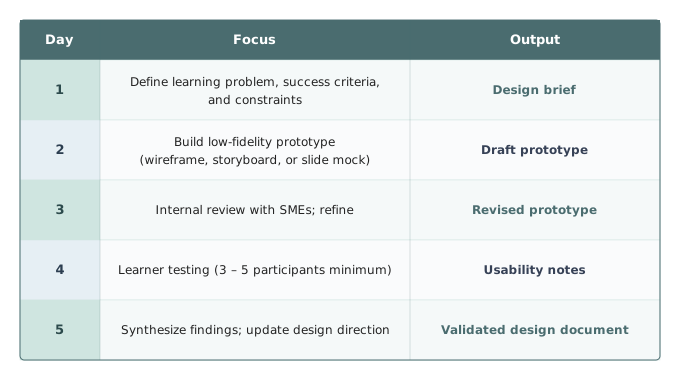
By Day 5, you have a defensible, evidence-backed direction for full development.
What Are the Methods of Prototype Validation?
Prototype validation is the structured process of testing a rapid prototype against real users to confirm it achieves its intended learning objective. There are several proven methods, and the best approach often combines two or more.
Think-Aloud Protocol. Learners narrate their thoughts as they move through the prototype. This surfaces confusion points, unclear instructions, and engagement gaps in real time. It’s particularly useful for eLearning scenarios and simulation-based training.
Task Completion Testing. Learners are given specific tasks to complete using the prototype (e.g., “Use this module to decide how you would handle this customer complaint”). Measure completion rate, time-on-task, and error patterns.
Pre/Post Knowledge Check. Even a rough prototype can include a short 3–5 question knowledge check before and after the learning experience. If learners aren’t showing measurable movement, the instructional design needs work — regardless of how polished the prototype looks.
Expert Review / Cognitive Walkthrough. A learning design expert or seasoned SME walks through the prototype and flags issues with instructional sequencing, cognitive load, or content accuracy. This doesn’t replace learner testing but is an efficient first filter.
Heatmaps and Interaction Data. For digital rapid prototypes built in tools like Articulate Storyline, Adobe Captivate, or Figma, interaction data can reveal where learners pause, skip, or disengage — without a single interview.
Rapid Prototyping Tools That Accelerate Validation
Choosing the right rapid prototyping tools is one of the highest-leverage decisions in the sprint process. The wrong tool creates a bottleneck; the right one lets you iterate in hours.
Top tools used in learning design rapid prototyping:
- Articulate Rise 360 — Ideal for web-based microlearning prototypes. Fast to build, easy to share for review.
- Figma — Excellent for wireframing and interactive mockups without writing code. Great for collaborative SME reviews.
- PowerPoint / Google Slides — Underestimated but powerful for click-through scenario simulations. Works well in live usability sessions.
- Camtasia — Useful for rapid video-based prototypes when demonstrating process or software tasks.
- Miro — Whiteboard-based tool for mapping learning journeys, branching scenarios, and content architecture before building anything.
When selecting among rapid prototyping services, prioritize tools your team already knows. Speed depends more on familiarity than features.
Common Mistakes to Avoid in Training Prototype Validation
Even experienced learning designers fall into predictable traps when running prototype validation sprints.
Mistake 1: Over-building the prototype. If it takes more than two days to build, it’s probably too complex. A prototype that takes two weeks is just slow development with a new label.
Mistake 2: Testing with the wrong audience. Testing with SMEs, managers, or L&D colleagues will give you expert feedback — but it won’t tell you whether a new hire or a frontline supervisor can actually learn from the material.
Mistake 3: Treating all feedback equally. One learner’s confusion is a data point. Three learners stumbling at the same place is a signal. Five is a mandate for redesign. Weight feedback by frequency and severity, not by who said it.
Mistake 4: Skipping the learning objective check. Rapid prototypes can become so focused on format and interactivity that teams forget to ask: Is this actually teaching anything? Every prototype session should include at least one measure of learning transfer, not just satisfaction.
Mistake 5: No documentation. If validation findings aren’t captured in a structured format, the sprint results evaporate. Maintain a simple observation log, note patterns, and produce a one-page design decision record before moving to full development.
Real-World Application: A 5-Day Sprint in Practice
Consider a mid-sized healthcare organization needing to train 2,000 employees on a new patient intake process. Traditional development might take 12 weeks. Instead, the L&D team runs a rapid prototyping sprint.
- Day 1: They identify three critical performance gaps from manager interviews and map them to three learning objectives.
- Day 2: They build a 10-minute scenario-based prototype in Articulate Rise using placeholder graphics and real case examples.
- Day 3: Two SMEs review content accuracy; five edits are made in under two hours.
- Day 4: Six frontline staff test the prototype. Two consistently miss the same branching scenario — clear evidence of a gap in how a key process step was explained.
- Day 5: The team revises the scenario structure, validates the fix with one additional tester, and documents the final design direction.
Full development begins on Week 2 with a validated foundation. Final delivery time: 6 weeks instead of 12.
Benefits of Rapid Prototyping Services for Learning Teams
For organizations that lack in-house capacity or expertise, professional rapid prototyping services offer significant advantages. External providers bring both the tools and the methodology to compress validation timelines without sacrificing rigor.
Key benefits include faster sprint facilitation, access to specialized rapid prototype development tools, and experienced facilitators who know how to extract actionable feedback from learner testing sessions. Outsourced rapid prototyping can also provide a neutral outside perspective — particularly valuable when internal stakeholders are too close to the content to assess it objectively.
Conclusion
Rapid prototyping isn’t a shortcut — it’s a smarter path to training that works. By validating your learning design in 5 days before full development begins, you eliminate guesswork, reduce costly rework, and build with confidence. The principles are straightforward: build fast, test with real learners, and revise based on evidence. The tools are accessible. The method is proven.
Whether you’re designing onboarding programs, compliance training, or performance support resources, rapid prototyping gives your team a competitive advantage that shows up in both the quality of the learning experience and the speed of delivery.
Ready to Validate Your Learning Design the Right Way?
Don’t spend months building training that misses the mark. Our team specializes in rapid prototyping services that compress your validation cycle and strengthen your instructional design before a single production dollar is spent.
Schedule a consultation today and find out how a 5-day rapid prototyping sprint can transform your next training project — faster, smarter, and with measurable results from day one.
Resources For L&D Leaders
free guide
free guide
insights | on the blog

ALLENCOMM Press Releases
AllenComm Earns Spot on Best Mobile Learning Content Providers 2026 List
eLearning Industry honors AllenComm for its custom mobile learning solutions for enterprise, built to improve performance outcomes at scale. SALT LAKE CITY, [July 29, 2026] — AllenComm has been named to eLearning Industry’s...
ALLENCOMM Press Releases
AllenComm Named a Top Employee Engagement Training Provider by eLearning Industry
AllenComm has been recognized by eLearning Industry as a 2026 top provider for employee engagement, cited for scalable, personalized L&D that drives measurable results. SALT LAKE CITY, [June 24, 2026]...
ALLENCOMM Press Releases